While working as a NOC Operator at DIGI-TEXX Vietnam, I wanted to see how much of what I was studying in networking and cybersecurity I could put into practice on something real. So I took the company's own structure as my target and designed a complete network for it in Cisco Packet Tracer, from requirements through to a fully configured, tested system.
I started by working out what the business actually needed, the same way I would on the job. DIGI-TEXX is organised into a few core groups: IT, general office functions such as HR and marketing, and an operations side made up of several project teams, plus a growing number of staff working from home. The design is sized around that real structure, with room to add more project teams later without rebuilding the network.
From there I built one addressing plan for the whole company and split it by department using VLANs, plus a separate VLAN just for managing the network devices. Each department gets its own segment, so traffic and access stay contained instead of everyone sitting on one flat network.
A firewall and router sit at the edge, handling internet access and translating the company's private addresses to a public one. A Layer 3 core switch routes between the department segments, and stacked access switches connect each department's own devices below it. Two servers, sized with enterprise-grade hardware and RAID-protected storage, run the services the business depends on day to day: web, email, DNS, DHCP, monitoring, file storage and backup.
Management access to the network devices themselves is locked down to SSH, restricted by access list to the IT and management segments specifically, with encrypted credentials.
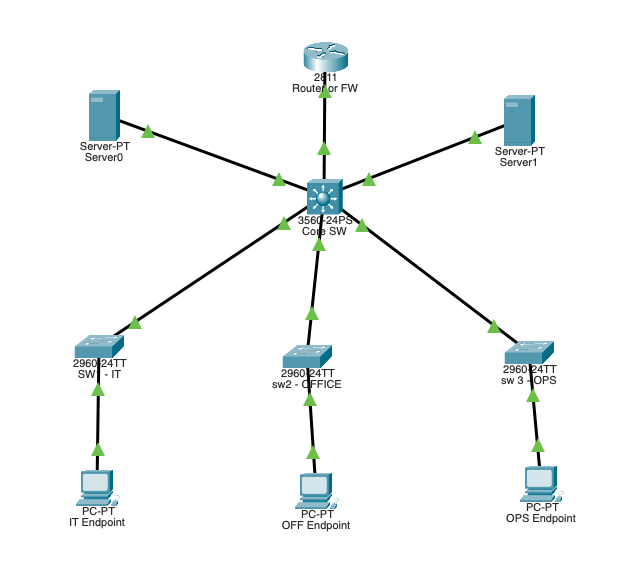
Every device in the design was configured individually in Packet Tracer: the router, the core switch, and each access switch. Once it was built I tested it as I would a real network — checking that every department could reach the core, that internet access and address translation worked, that routing was correct end to end, and that devices picked up their addresses automatically.
It's a simulation rather than a live deployment, but every part of it, from the requirements to the addressing plan to the final configuration, is something I can walk through and explain, built on a network modelled on a company I actually worked inside.